DisplayBuddy Release Notes
Complete list of updates we've shipped to our amazing customers.
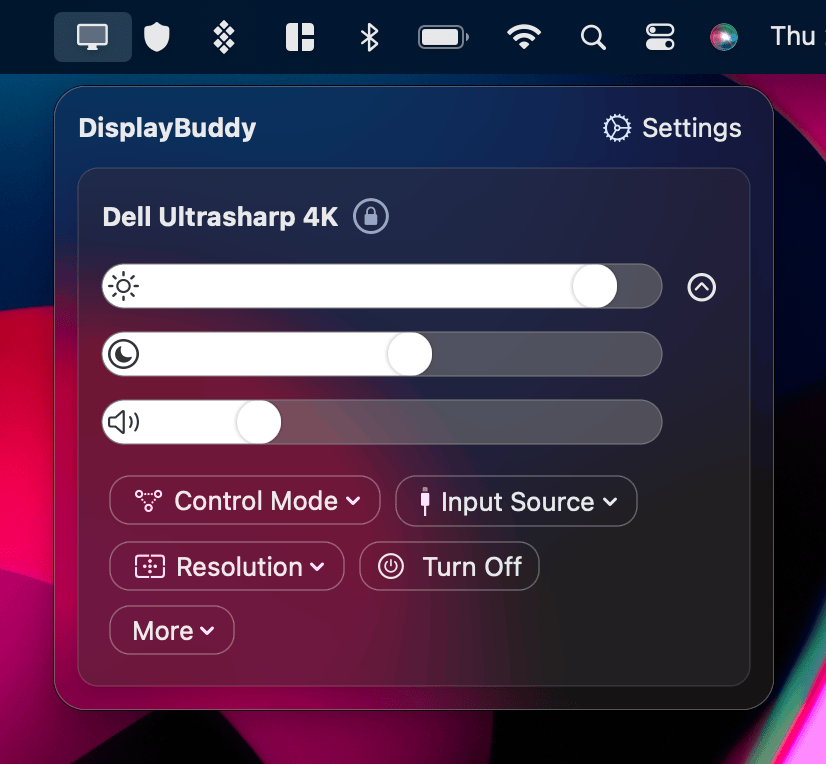
We're hard at work on DisplayBuddy and you see the complete list of updates we've shipped to our amazing customers. DisplayBuddy updates, including major updates like DisplayBuddy 2 and 3, are free for all users, always. We believe that once you have paid for the app, you own your copy, and you shouldn't have to pay for it again.
3.9.6: Color Profiles and macOS Display Presets
Released on August 29, 2026
New Features
- DisplayBuddy now supports selecting a color profile or macOS Display Presets (including Reference Modes) on compatible displays. These settings can also be changed using presets.
Fixes and Improvements
- Fixes an issue where the volume slider might sometimes be hidden for some DDC displays.
- Fixed an issue where the preset menu could be cut off.
- Improved the responsiveness of Dark Mode, Night Shift, and True Tone controls.
3.9.1: More languages
Released on June 28, 2026
New Features
- Sync is now smoother.
- DisplayBuddy now speaks even more languages!
3.9.0: macOS Shortcuts Overhaul and Control Center Support
Released on June 11, 2026
New Features
- Deep Shortcuts Support: Our macOS Shortcuts have been completely overhauled, giving you full control to automate every part of your display setup with the Shorcuts app, spotlight or Siri! Start by typing: "Set Brightness" in Spotlight Search, or just ask Siri!
- New Control Center Controls: You can now activate a Preset, or toggle your Schedules from the Control Center on macOS!
3.8.0: LG MyView Smart Monitor Control
Released on May 27, 2026
New Features
- DisplayBuddy can now control LG MyView Smart monitors and TVs running webOS over Wi-Fi. Control the real volume, power, input source of your display, and even get a full remote control within DisplayBuddy.
- Users already love to control their Samsung Smart monitors with DisplayBuddy, and we're glad to expand this to LG MyView displays as well.
3.7.0
Released on May 17, 2026
New Features
- DisplayBuddy now speaks even more languages! DisplayBuddy is now available in Czech, Hungarian, Dutch, Romanian, Russian, Swedish, and Thai.
- Samsung Smart Control is now much smoother, with improved connection stability and a redesigned setup view.
Fixes and Improvements
- DisplayBuddy CLI responsiveness has been improved.
- DisplayBuddy now lets macOS take over when the connected audio device can be controlled natively by the system.
3.6.1
Released on May 11, 2026
Fixes and Improvements
- Fixes an issue with the DisplayBuddy CLI on Setapp.
- Fixes a broken link to the DisplayBuddy getting started guide in settings.
3.6.0: Bonjour!
Released on May 3, 2026
Note: DisplayBuddy now requires macOS 12 or later.
New Features
- DisplayBuddy now speaks your language! DisplayBuddy is now available in French, Spanish, German, Chinese Traditional, and Chinese Simplified. More languages coming soon!
3.5.0
Released on April 14, 2026
New Features
- A beautiful new onboarding and little delightful animations across the app to make DisplayBuddy more intuitive for you.
- Schedules now supports activating a preset when DisplayBuddy is launched.
Fixes and Improvements
- Improves audio volume control and fixes an issue where random volume values could be sent to the monitor.
3.4.1: UltraBright for Studio Display XDR
Released on March 25, 2026
New Features
- UltraBright now supports your shiny new Apple Studio Display XDR, and all the latest MacBook hardware.
3.4.0: HDR, True Tone & Night Shift
Released on March 21, 2026
New Features
- DisplayBuddy can now control True Tone, Night Shift, and Dark Mode across all displays.
- DisplayBuddy can now also toggle HDR for displays that support high dynamic range on macOS
- And of course, you can use presets to automate True Tone, Night Shift and Dark Mode.
Fixes and Improvements
- Cleaned up the Settings menu to make it easier to scan and navigate, grouped similar items together for a cleaner, less busy layout.
- DisplayBuddy can now also turn on or off HDR for displays that support HDR on macOS
- You can also use presets to automate True Tone, Night Shift and Dark Mode.
3.3.0: DisplayBuddy Command Line (CLI) and MCP
Released on March 14, 2026
DisplayBuddy CLI
- DisplayBuddy now includes a full-fledged Command Line Interface (CLI).
- You can control DisplayBuddy features directly from Terminal for automation and power-user workflows.
- Full documentation is available in the new Command Line + AI docs section.
- DisplayBuddy now also has a MCP server so that your agents can control your monitors directly.
3.2.3
Released on March 7, 2026
Fixes and Improvements
- DisplayBuddy now shows you a small hint on first onboarding to find it easily in your menu bar.
- Communications with most monitors is much smoother now in DisplayBuddy.
3.2.2
Released on Feb 17, 2026
Fixes and Improvements
- Fixes an issue where resolution would not apply when using Presets if only a single display was connected.
3.2.0
Released on Feb 1, 2026
New Features
- DisplayBuddy can now save your display arrangement (layout) across multiple displays and restore it later with one click.
- You can now set the main display (the display with the macOS menu bar and Dock) using Presets.
- To try this, create a Preset and enable the Save Display Arrangement toggle.
Fixes and Improvements
- Fixes an issue where the resolution check mark would not update after changing resolution.
3.1.0
Released on Jan 4, 2026
Fixes and Improvements
- DisplayBuddy has a brand-new Settings experience to make it easy to customise your settings!
- DisplayBuddy now makes it easier to transfer license from your old Mac to your new one.
3.0.7
Released on Dec 22, 2025
Fixes and Improvements
- Fixes an issue where DisplayBuddy would repeatedly ask for your license key.
3.0.6
Released on Dec 19, 2025
Fixes and Improvements
- DisplayBuddy now has a brand-new onboarding experience.
- Fixes an issue with some users being unable to connect to their Samsung smart displays.
3.0.4
Released on Nov 20, 2025
Fixes and Improvements
- Improved connectivity with Samsung Smart Displays after your Mac wakes up from sleep.
- DisplayBuddy now uses the right maximum brightness value reported from your display via DDC.
- DisplayBuddy is smoother to use with most displays using the sliders.
3.0.1
Released on Sept 22, 2025
Schedules
- Introducing Schedules: automatically activate your Presets (saved display settings) with triggers like sunrise/sunset, specific times, charger status, dark mode, and more.
- With Schedules, DisplayBuddy completes the loop: Control your displays > Save them as Presets > Automate with Schedules.
macOS Tahoe Update
- A brand new app icon that feels right at home in your dock.
- All windows redesigned with a sleek liquid glass look.
- Put your Presets directly in Control Center for instant access.
- Spotlight & App Intents support, so you can run your presets by just typing "Activate Preset", or ask Siri!
2.32
Released on June 1, 2025
- Samsung Smart Monitors: Now along with the real volume, you can also control the real brightness and contrast of Samsung Smart Monitors!
2.21
Released on May 27, 2024
- UltraBright: Take full advantage of your Macbook screen by unlocking it's full 1600 nits of brightness!
- Samsung Smart Monitor Control: Control the real volume, power, input source and more of modern Samsung Smart Monitors like the M5, M7, M8 and ViewFinity S9.
2.0
Released on August 28, 2023
- Complete Redesign: A built from the ground up redesign that feels right at home on modern macOS.
- Presets: Save settings across multiple monitors and restore them later with a single click.
- Sync: Refreshed interface for following one display by others.
- Mute Support, HiDPI resolutions, and better keyboard handling.
DisplayBuddy
for macOS 10.13+
Take control of your monitors
Control brightness, contrast, volume, and much more.
Buy NowLifetime license • 7-day refund on full-price purchases