Is BetterDisplay Worth It? Pros, Cons & Alternatives
Is BetterDisplay worth it? Yes, but only for developers and power users. Honest review of pros, cons, and Mac alternatives like DisplayBuddy.
Last updated: May 2026
Wondering if BetterDisplay is worth installing on your Mac? Short answer: yes, but only if you're a developer or a power user who needs virtual displays, custom HiDPI scaling, or EDID overrides. For everyday monitor control, the dense settings panel is overkill, and the most-requested features (Presets, Schedules) aren't there.
Here's an honest breakdown of what BetterDisplay does well, where it falls short, and how it compares to DisplayBuddy, the most popular alternative for everyday Mac users:
BetterDisplay is a power-user tool built for developers and tinkerers. Its strengths are virtual displays, custom HiDPI scaling, EDID overrides, and CLI scripting.
DisplayBuddy is built for everyday Mac users. Its strengths are effortless brightness control, multi-monitor Presets, automated Schedules, and a clean native macOS interface.
Here's what the two apps actually look like side by side:
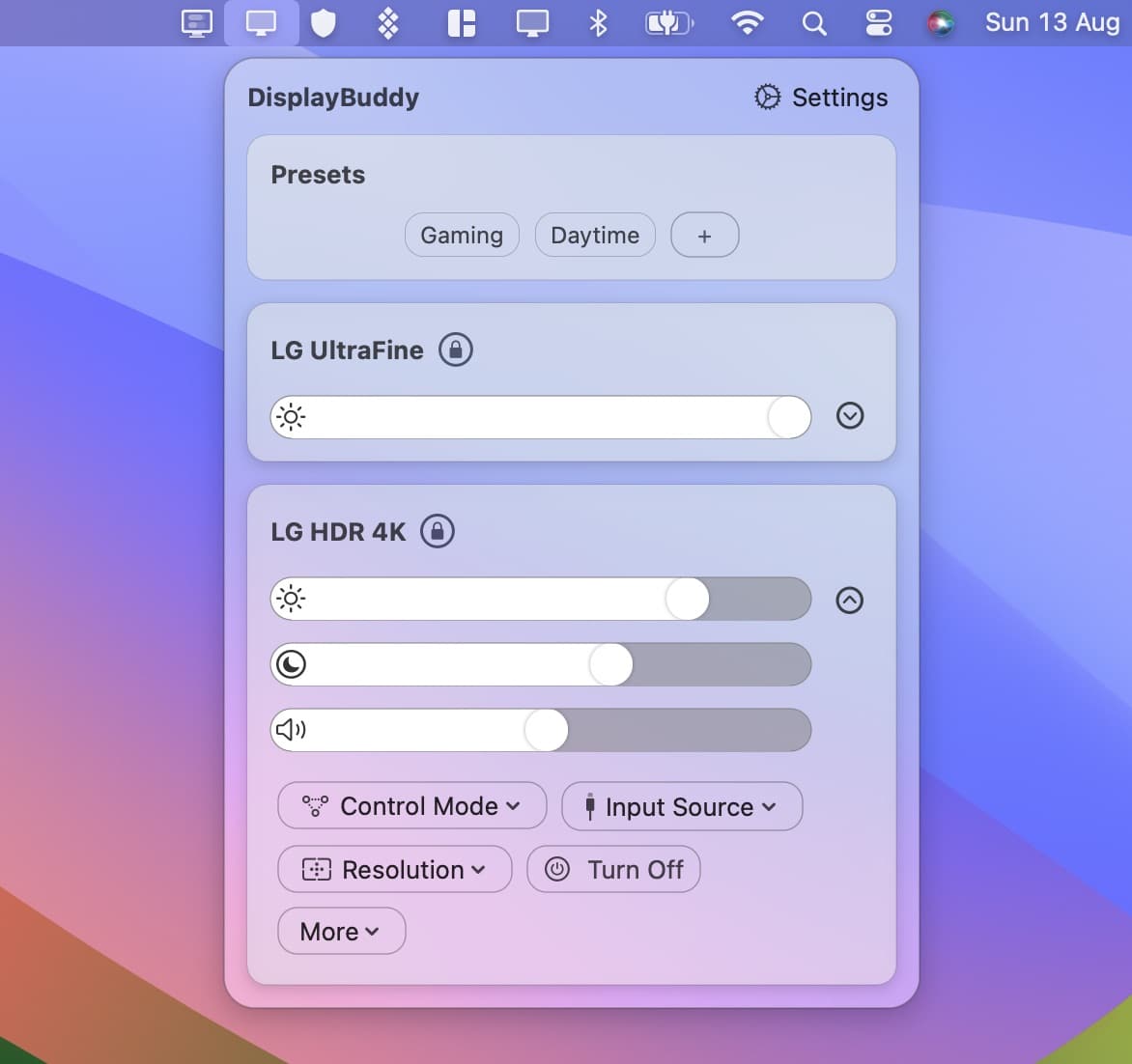
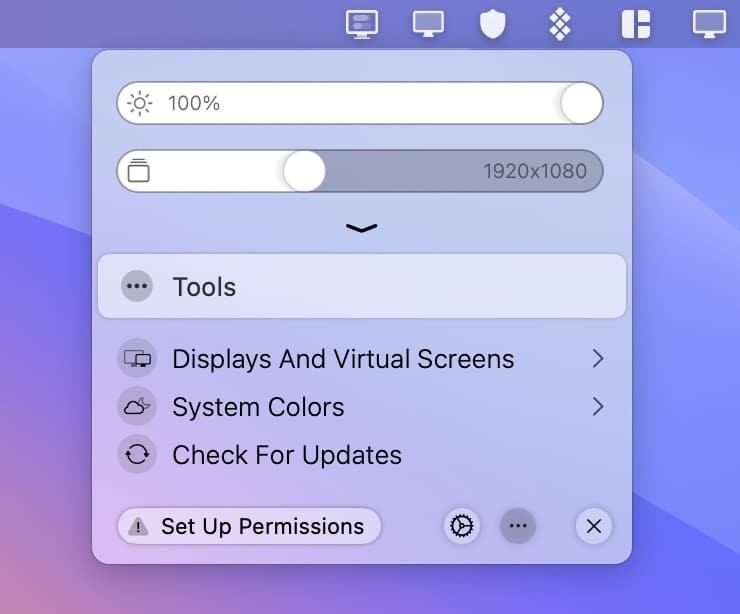
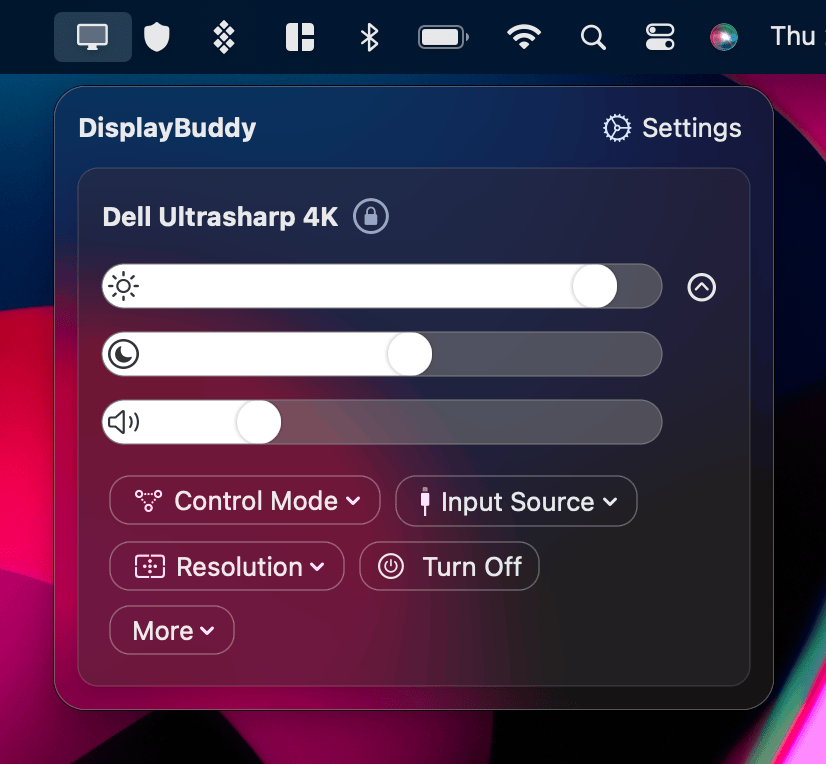
DisplayBuddy is designed to make monitor control effortless and intuitive. Its interface mirrors Apple's own design language: clean, focused, and immediately understandable. BetterDisplay, while powerful, presents users with a dense settings panel that can feel overwhelming if you just want to adjust brightness or save a preset.
For most Mac users, DisplayBuddy is the better choice. Here is the full breakdown.
BetterDisplay vs DisplayBuddy: Feature Comparison
| Feature | DisplayBuddy | BetterDisplay |
|---|---|---|
| Everyday display control | ||
| Brightness and contrast control (DDC) | ✅ Yes | ✅ Yes |
| Volume control | ✅ Yes | ✅ Yes |
| Keyboard brightness keys | ✅ Yes | ✅ Yes |
| Input source control | ✅ Yes | ✅ Yes |
| Presets (save and restore all display settings) | ✅ Yes | ❌ No |
| Save display layout and monitor arrangement | ✅ Yes | ❌ No |
| Sync brightness across all monitors | ✅ Yes | ⚠️ Basic |
| Schedules (automate settings by time or event) | ✅ Yes | ❌ No |
| Native macOS UI | ✅ Yes | ⚠️ Complex |
| macOS integration | ||
| Siri integration | ✅ Yes | ❌ No |
| macOS widgets | ✅ Yes | ❌ No |
| Spotlight integration | ✅ Yes | ❌ No |
| Apple Shortcuts support | ✅ Yes | ✅ Yes |
| Samsung Smart Monitor control (M5, M7, M8, S9) | ✅ Yes | ❌ No |
| Advanced display features | ||
| XDR and HDR brightness upscaling | ✅ Yes | ✅ Yes |
| Software dimming to black | ✅ Yes | ✅ Yes |
| Virtual displays and dummy screens | ❌ No | ✅ Yes (free) |
| EDID overrides | ❌ No | ✅ Yes |
| Custom HiDPI and resolution scaling | ❌ No | ✅ Basic free, flexible Pro |
| Picture-in-Picture window | ❌ No | ✅ Yes |
| GPU dithering controls | ❌ No | ✅ Yes |
| LG, Philips, Yamaha TV/AVR control | ❌ No | ✅ Yes (free) |
| Platform and pricing | ||
| Apple Silicon native | ✅ Yes | ✅ Yes |
| Windows support | ✅ Yes | ❌ No |
| CLI scripting support Scripting and automation via command line. view docs | ✅ Yes | ✅ Yes |
| Homebrew install | ✅ Yes | ✅ Yes |
| Paid upgrade | One-time purchase | BetterDisplay Pro (one-time) |
| Money-back guarantee | ✅ 7 days (Mac) | ❌ No |
Looking for BetterDisplay on Windows?
BetterDisplay is Mac-only and has no Windows version.
If you need the same level of monitor control on Windows — brightness, contrast, volume, Presets, and keyboard shortcuts — DisplayBuddy is the best option. It is the only app in this category that runs natively on both Mac and Windows, with the same features on both platforms.
Get DisplayBuddy for Windows → Learn more →
Why Mac Users Need a Display Control App
macOS gives you surprisingly little control over external monitors. The built-in System Settings let you change resolution and arrange displays, but that is about it. There is no system-level brightness slider for external monitors, no way to save and restore multi-monitor setups, and no automation for display settings when you plug in a different monitor or switch between work and evening use.
This is a problem because most external monitors support DDC/CI, a protocol that allows software to control brightness, contrast, volume, and input source directly over the display cable. Apple simply does not expose these controls in macOS. Third-party apps like BetterDisplay and DisplayBuddy exist to fill this gap.
The two apps take very different approaches. BetterDisplay started as a developer tool for creating virtual dummy displays and has evolved into a comprehensive utility with deep system-level display manipulation. DisplayBuddy was built from the ground up as a native macOS app focused on the controls most people actually use daily: brightness, contrast, volume, presets, and automation.
Why Mac Users Choose DisplayBuddy Over BetterDisplay
Presets: Save Everything, Switch Instantly
Presets are DisplayBuddy's most-used feature. BetterDisplay does not have them. The BetterDisplay developer confirmed this on GitHub in January 2024, listing Presets as "coming in a future update." As of the time of writing, they are still not available in any version of BetterDisplay.
With DisplayBuddy Presets, you can:
- Save brightness, contrast, volume, input source, display arrangement, and resolution as a named Preset across every connected monitor
- Switch between setups like "Work Mode" and "Evening Mode" with a single click
- Apply the switch across all monitors simultaneously, with no per-screen adjustments
- Trigger Presets via Siri, Apple Shortcuts, Control Center widgets, or Spotlight
Sync: One Adjustment, All Monitors
With multiple monitors, keeping brightness consistent is a constant manual task. Both apps offer brightness sync, but DisplayBuddy's implementation goes further:
- Adjust any one monitor and all others follow automatically
- Works via the app, keyboard shortcuts, or Siri voice commands
- Stays active in the background with no manual management required
- Ties directly into Presets and Schedules, so your Sync settings carry across automated workflows
BetterDisplay includes basic brightness and image control sync across displays. DisplayBuddy builds on this with Siri control, background persistence, and integration with Presets and Schedules that BetterDisplay does not offer.
Schedules: Your Displays Change Automatically
DisplayBuddy Schedules let your display settings change automatically based on triggers you configure once:
- Time of day (e.g., dim all monitors at 9 PM)
- Sunrise and sunset
- Mac lock and unlock
- Dark Mode toggle
- Monitor connected or disconnected
- Charging state (separate settings on battery vs. plugged in)
Once set up, your displays just work the way you want. No manual adjustments. BetterDisplay does not offer Schedules.
A Native macOS Interface
DisplayBuddy is built to look and feel like a native Apple app. The interface mirrors Control Center, with smooth animations and a layout that requires no learning curve.
BetterDisplay is powerful, but its interface surfaces its entire feature set at once. Users who want to do something simple, like dim an external monitor with a keyboard shortcut, often find themselves looking at a dense settings panel full of technical terminology they do not need. The difference in day-to-day experience is significant.
Samsung Smart Monitor Support
DisplayBuddy includes built-in support for Samsung & LG Smart Monitors over Wi-Fi, including full control of brightness, contrast, volume, and input source, plus a built-in remote. BetterDisplay does not support Samsung Smart Monitors.
Wide Monitor Compatibility
Beyond Samsung Smart Monitors, DisplayBuddy works with virtually any DDC/CI-capable external display. That includes popular Mac setups like the LG DualUp (28MQ780), the BenQ MA270U, the Dell U2415, and 1440p 21-inch panels — all standard scenarios where DisplayBuddy delivers brightness, contrast, and volume control directly from your keyboard. BetterDisplay also handles DDC for these monitors, but DisplayBuddy adds the workflow features that matter day-to-day: Presets to save and restore each monitor's settings, brightness Sync across mismatched panels, and Schedules to automate adjustments by time or system event.
Spotlight, Siri, and Control Center Integration
In macOS Tahoe, DisplayBuddy adds integration points that BetterDisplay does not match:
- Spotlight: search for and activate any Preset without opening the app
- Control Center widgets: access and switch Presets directly from the menu bar
- Siri commands: "Hey Siri, set all monitors to 50% brightness"
What Is BetterDisplay?
BetterDisplay, also commonly written as "Better Display" with a space, is a display management app for macOS created by developer István Tóth. Originally released as BetterDummy, it started as a tool for creating virtual dummy displays on headless Macs and has grown into one of the most feature-rich display utilities available for macOS, targeting power users and developers who need low-level control over how macOS handles external monitors.
BetterDisplay is genuinely impressive in scope. It is one of the few apps that can manipulate macOS display handling at the system level, and for certain advanced use cases, there is nothing else like it. That said, its depth comes with real trade-offs in complexity and daily usability, which is why many users end up looking for alternatives.
BetterDisplay Features: What It Does
Free features available without paying:
- DDC brightness, contrast, and volume control for external monitors
- Native brightness and volume keyboard key support
- Virtual screen creation for headless Mac setups, streaming, and dummy displays
- Basic custom HiDPI resolution support
- Multi-display brightness sync (basic)
- Input source switching
- Apple Shortcuts and App Intents support
- HTTP and custom URL scheme support for automation
- Command line integration
- LG webOS TV, Samsung Tizen TV, Philips Android TV, and Yamaha AVR networked control
- Color mode selector and unexposed refresh rates on Apple Silicon
- Software dimming including combined dimming and dimming to black
Pro features requiring a paid upgrade ($21.99 one-time):
- Flexible HiDPI scaling for monitors macOS does not handle natively
- EDID overrides to fix display detection and resolution issues
- Advanced HDR calibration, color adjustments, and video filters (basic XDR/HDR upscaling is available in the free tier; DisplayBuddy also supports XDR/HDR upscaling)
- Picture-in-Picture windows for any display
- Advanced display sync and layout management
- Custom scaled resolution editing
- Display disconnect and reconnect control
- Full-screen streaming and mirror configuration
- Display protection features
A 14-day free trial of BetterDisplay Pro is available. The current major version is BetterDisplay v4.x, supporting macOS Tahoe, Sequoia, Sonoma, and Ventura.
How to Download BetterDisplay
BetterDisplay is not available on the Mac App Store. It can be installed via Homebrew with brew install --cask betterdisplay.
Who Is BetterDisplay Best For?
BetterDisplay is the right choice for a specific set of users:
- Developers running headless Macs who need virtual displays for CI/CD pipelines, remote access, or testing without a physical monitor connected. This is what BetterDisplay was originally built for, and it remains the best tool for it.
- Users with non-standard monitors where macOS does not offer the correct resolution options. BetterDisplay's flexible HiDPI scaling and EDID overrides can force resolutions and scaling that macOS refuses to provide natively. If your monitor looks blurry or the wrong size and System Settings cannot fix it, BetterDisplay Pro may be the only solution.
- HDR and XDR power users who want fine-grained HDR calibration, color adjustments, and video filters beyond basic brightness upscaling. (Note: both DisplayBuddy and BetterDisplay support XDR/HDR brightness upscaling, but BetterDisplay offers deeper calibration controls.)
- Users who need PIP windows of other displays for streaming, presentation, or multi-display workflows where seeing one screen on another is useful.
If any of those scenarios describe your setup, BetterDisplay is worth evaluating. It handles these edge cases better than any other macOS display utility, including DisplayBuddy.
However, if your needs are more typical (controlling brightness and contrast from your keyboard, saving multi-monitor setups as named Presets, automating display settings with Schedules, and managing your displays through Siri, Widgets, and Spotlight), BetterDisplay does not cover those workflows. Its free tier offers basic brightness sync but lacks Presets, Schedules, Siri integration, and Samsung & LG Smart Monitor support entirely. For daily monitor management, DisplayBuddy is the more complete tool. It includes a 7-day free trial on Windows and a 7-day money-back guarantee on Mac.
Common Problems with BetterDisplay on Mac
A Dense Interface That Gets in the Way of Simple Tasks
BetterDisplay's biggest weakness is its interface. The app surfaces every advanced feature up front, which makes simple tasks harder than they need to be. Users who want to save a brightness setting or switch monitor inputs find themselves navigating a settings panel designed for developers configuring low-level display parameters.
This is the most consistent complaint about BetterDisplay across Mac user communities: it is built for power users, and it shows, even when all you want is a brightness slider.
Display Settings That Reset After Sleep
A well-documented pattern across multiple versions of BetterDisplay is that certain settings do not survive sleep and wake correctly. Confirmed issues reported on the BetterDisplay GitHub include:
- Brightness resetting to 100% on wake from sleep
- Custom resolutions and scaling configurations reverting to defaults
- Image adjustment settings clearing after the display sleeps
- Refresh rate settings resetting to a fixed rate on wake
The BetterDisplay developer has attributed some of these to a macOS bug affecting certain displays on wake, but the issues have been reported across M1, M2, and M3 Macs on Sonoma, Sequoia, and Tahoe. This is a real friction point for users relying on BetterDisplay for daily monitor management.
Advanced Features Are Behind a Paywall
BetterDisplay's free version covers brightness control, virtual displays, basic custom resolutions, and multi-display brightness sync. But the features that set BetterDisplay apart from simpler tools, including flexible HiDPI scaling, EDID overrides, XDR/HDR upscaling, layout protection, and Picture-in-Picture, all require BetterDisplay Pro. Users who install the free version expecting the full BetterDisplay experience discover a paid upgrade is required for the advanced capabilities.
No Presets or Schedules, and Limited Sync
BetterDisplay offers basic brightness sync across displays, but it lacks the two features Mac users with multiple monitors request most: Presets and Schedules. Presets are listed as a planned future addition by the developer, but have no confirmed release date and are absent from BetterDisplay v4.x. Schedules are not available and have not been announced. Without Presets and Schedules, BetterDisplay's sync cannot be tied to saved configurations or automated triggers, limiting its usefulness for users who switch between setups throughout the day.
What Mac Users Say About DisplayBuddy
DisplayBuddy has a 4.8-star average across 500+ user reviews. Here's what people switching from BetterDisplay (and other display utilities) have said:

"If you've got an external display this app is absolutely life changing."

"It works! Never touching the clunky button to adjust volume again."

"Immediate buy! Works great with my Dell U2518D."

"This is amazing and exactly what I was looking for! Great job!"
Frequently Asked Questions
Is BetterDisplay free?
Is BetterDisplay Pro worth it?
What is the best BetterDisplay alternative for Mac?
Is BetterDisplay better than DisplayBuddy?
Does BetterDisplay have Presets?
Does BetterDisplay work on Windows?
Which is better for Mac: BetterDisplay or DisplayBuddy?
How do I control external monitor brightness on Mac?
Is BetterDisplay safe to use on Mac?
Can I use BetterDisplay and DisplayBuddy together?
What is the difference between BetterDisplay free and BetterDisplay Pro?
Is Better Display the same as BetterDisplay?
The Verdict: BetterDisplay vs DisplayBuddy
BetterDisplay is a legitimate tool for a specific audience: developers who need virtual displays, power users forcing custom resolutions on non-native monitors, and anyone troubleshooting display detection with EDID overrides. If those use cases apply to your setup, consider BetterDisplay.
For everyone else, DisplayBuddy is the better Mac display app. Most Mac users do not need EDID overrides or CLI scripting. They need brightness and contrast control from their keyboard, a way to save multi-monitor setups as named Presets, and the option to automate settings without touching anything. DisplayBuddy delivers all of that, offers deeper Sync integration with Siri and automation that BetterDisplay cannot match, adds Samsung & LG Smart Monitor support, and wraps it in an interface that feels like it belongs on macOS.
DisplayBuddy is a one-time purchase with lifetime updates, a 7-day free trial on Windows, and a 7-day money-back guarantee on Mac.
Compare DisplayBuddy With Other Apps
Related guide: How to control external monitor brightness on Mac
DisplayBuddy
for macOS 10.13+
Take control of your monitors
Control brightness, contrast, volume, and much more.
Buy NowLifetime license • 7-day refund on full-price purchases